
SNAPPT-FAQ
What types of documents does Snappt accept?
Snappt currently accepts the following types of documents:
- Bank Statements
- Paystubs
- Investment accounts
- Credit/Debit Card Statements
- Cash App/Chime Statements
- Utility Bills
- Social Security Statements & Benefits Letters (ssa.gov)
- Social Security Benefits Letter
- Tax Transcripts (irs.gov)
- Department of Veterans Affairs Benefit Letters (a.gov)
- Form I-20 Study in the States
What is the difference between Insufficient Documentation and Edited?
If a document is evaluated as Insufficient Documentation that means we were unable to evaluate the document. This could be because it is a document type we do not accept like an offer letter or tax return, or it could be downloaded in the wrong format like Print to PDF.
Insufficient Documentation = unable to evaluate the document due to format or wrong document type
Edited = Snappt found conclusive proof that the document has been altered or manipulated, or is from an illegitimate source
What is Print to PDF and why cant Snappt accept these files?
Print to PDF is when tries to download a document, but instead of downloading it directly they go to Print/Export> Save as PDF. We are unable to evaluate documents that have been saved in this format because it erases all the metadata and there is nothing in the digital fingerprint for us to evaluate. The Applicant will need to go directly to their financial institution or payroll provider and download the documents directly from the site rather than trying to print the documents and then saving them.
Are there guides I can give to my applicant who is struggling to upload documents?
Yes! Below are some guides on how to properly download documents you can give to your applicants. These are also available on the Resources tab in Snappt!.
VIOEO: How To Properly Download Documents
GUIDE: Tips and Tricks for a Successful Download
If these resources dont resolve the issue, you can verify the applicant outside of Snappt as you did before signing up with us. Just be sure to make a note in the applicants file that the applicant was not able to provide documents that meets Snappt's requirements, however, you did your own due diligence in qualifying the applicant as you typically would per your property's specific income requirements.
What if my applicant does not have PDF pay stubs or only get paper checks?
We would recommend, if your company policy permits, having the applicant submit their most recent bank statements. Once we have evaluated the bank statements and you know if they are Clean, you can cross reference with the pay stubs to make sure the deposits align correctly.
What if my applicant is having difficulty uploading their bank statements?
In this situation, if your company policy permits, we would recommend having the applicant come into your office and log onto their financial institutions website in front of you and watch them download the documents. This way you can make a note in the applicant file that while they were not able to provide income that meets Snappt's download requirements, they did come into the office and download the statements directly in front of you.
What if my applicant does not have access to online banking?
Follow these recommended steps:
- Ask your applicant to call their bank and have them provide their most recent bank statements emailed to them.
- Ask your applicant to download their most recent bank statements from their email and upload them to Snappt
- Ask your applicant to upload their most recent pay stubs to Snappt.
What if my applicant does not have PDF bank statements or PDF pay stubs?
Option 1 Watch them download documents in front of you and make note in their file.
Option 2 Verify documents manually outside of Snappt as you did before using our service.
Does Snappt accept Offer Letters?
No. Offer Letters are not standardized and are usually created in easily accessible programs such as MS Word. If submitted, they will be ruled as Insufficient Documentation. They can still be accepted and taken into consideration at the site level, but Snappt will not be able to verify their authenticity and you should resort to your company policy on how to verify employment.
We do recommend that if an applicant is submitting an offer letter, that they upload at least one bank statement for Snappt to evaluate. This way Snappt is still evaluating at least one portion of the applicants income.
Does Snappt accept W2s/ Tax Returns?
No. Tax Returns are not a standardized document and people can use programs such as Turbo Tax to create them and fill in any amounts. If submitted, they will be ruled as Insufficient Documentation. Offer letters can still be accepted and taken into consideration at the site level. We can also recommend having the applicant go to irs.gov and downloading a Tax Transcript which is a federal standardized document that Snappt does accept.
Does Snappt accept International Statements
Not at this time. The currency change and language on the document impacts the metadata and changes the document forensics so we cannot evaluate as we typically would. We can however review directly downloaded electronic I-20 Study in the State documents if your applicant is an international student!
Otherwise, if your company policy permits, we would recommend having them come into your office and log onto their financial institution's website in front of you and watch them download the documents. This way you can make a note in the applicant file that they were not able to provide income that meets Snappt's requirements, however, they did come into the office and download the statements directly in front of you.
Is there a recommended email when sending the applicant link?
The Applicant Link sent to prospects is a static link that will never change so we recommend making a template or autoresponder and including the link and your requirements there. Here is the suggested copy to use in that template:
- Subject: Complete Your Rental Application
- Body:
Thank you for submitting your application to [Property Name]. We are excited that you are interested in joining our community!
To complete your application, please upload your supporting documents HERE We ask that you submit the following for our review:
- x number of bank statements
And/or - x number paystubs
- x number of bank statements
- If you do not have access to directly downloaded bank statements or pay stubs in PDF format please provide an alternative form of documentation directly to the leasing professional. Once you submit your documents, we can complete your application review.
- Please find resources below for downloading documents:
- Thank you!
What if my applicant wants to dispute an Edited ruling?
If an applicant would like to dispute that they did not edit their documents, they can email us at disputes@snappt.com to open an appeal.
Is there an email or phone number the applicant can call for assistance?
Not at this time. Please have your onsite team reach out to support@snappt.com for solutions to applicant upload issues so you can learn how to resolve the issue if it comes up again for a more efficient application process
How do I turn off emails notifications about document submissions?
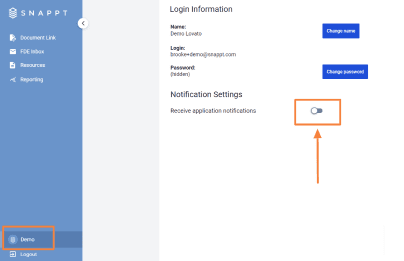
If you do not wish to receive emails about applicant submissions, in your Snappt Dashboard, you have access to turn off email notifications.
When logged into your Snappt account, simply click on your name at the bottom left corner and then turn the Notification Settings toggle to off: